AUX OS - An operating system for audio production and design
A year ago, I was in the market for a new computer. As always, there seemed to be only one obvious option: browsing through the latest lineup of MacBooks. They all looked impressive, well designed, packed with processing power, and seamlessly integrated into an ecosystem that lures and locks you in like no other. Yet I couldn’t bring myself to spend €2,000 or more. I didn’t want another convenience device built for everyone. I longed for something that would bring back the excitement and fascination with digital creation and exploration which drew me to electronic music, design, and programming in the first place. What I missed wasn’t just a nostalgic idea. What I missed was personal computing.
So, I began exploring alternatives. I could have bought another powerful device and installed Windows, but that would have defeated the purpose. I needed something different. That’s when I turned my attention to the current audio ecosystem on Linux.
Linux has always been amazing, but it was never he go-to choice for desktop computing until now. I run servers, dabble in self-hosting, and generally resonate with Linux’s ideology. To my surprise, I was overwhelmed by the options available. I’m not just talking about distributions, but the sheer amount of audio software and music-making tools now natively available on Linux.
In the past, there were a few options like Ardour, but most other tools required running Windows apps through Wine, an emulation layer that introduced processing overhead, latency, and instability, especially for live audio performances. The main reason I never considered Linux for this use case was Ableton Live, which wasn’t available or easy to run with Wine. Over the years, however, I’ve branched out to other DAWs, not because anything was wrong with Live, but because I was seeking different workflows. One DAW stuck with me since the mid-2000s: Renoise, a tracker, a DAW, and a sample-manipulating powerhouse with VST support and scripting. It’s unique, and it runs natively on Linux.
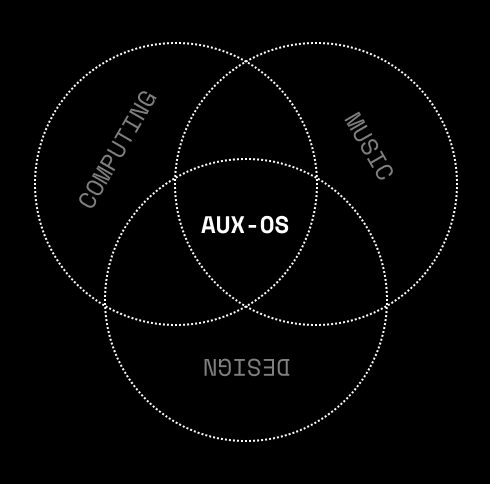
I knew I wanted to give this a try, but I didn’t want to just install Ubuntu or Fedora and a few DAWs. I wanted to harness Linux’s flexibility and configurability to create an ecosystem focused on three pillars: computing, music, and design. It needed to be utilitarian, decluttered, non-distracting, and non-tracking. The initial idea was simple: boot the device directly into the DAW. Since I also do a lot of coding and graphic design, it had to offer more than just a DAW. But the emphasis was on eliminating distractions, a working, creative machine tailored to me, keyboard-focused, quick, responsive, and flow-inducing. So I ventured into the more raw distributions. From previous projects, I had worked with Mint and Arch Linux, and I remembered the lack of out-of-the-box configuration, but also all the benefits and performance that came with tailoring everything to its specific needs. Arch is lightweight, has good support for a wide range of hardware, and boasts a large community where you can find resources, applications, and scripts.
It should be my operating system, my auxiliary ecosystem. It should be AUX OS.
The Setup
Installing Arch can be challenging, but luckily, there’s a new install assistant to get you started faster than ever. It lets you select sensible defaults. For a beginner-friendly, less intimidating approach, this video is a great resource.
Window Management
I wanted to move away from the classic desktop paradigm and commit to a tiling window manager, a keyboard-focused way of arranging and navigating windows. It allows you to configure application layouts and develop muscle memory quickly. There are more options than ever, but Hyprland stands out. It’s smooth, highly configurable, and well designed, and it’s gained significant hype for good reason.
The Basics
The foundation of AUX OS is built on intentional, utilitarian tools that blend seamlessly into the workflow:
- Waybar: A highly customizable status bar for Wayland compositors like Hyprland. It supports dynamic widgets for system monitoring (CPU, RAM, network), workspaces, audio controls, and more, all while maintaining a minimalist aesthetic. Its configuration is declarative, allowing you to tweak layouts, colors, and functionality via JSON or CSS-like syntax.
- Rofi: A simple yet extensible launcher and window switcher. It replaces traditional application menus with a fast, searchable interface comparable to Raycast. It’s even more customizable, as it can also serve as a script launcher.
- Kitty: A GPU-accelerated terminal emulator that prioritizes speed and configurability. Unlike heavier alternatives, it renders text and graphics efficiently, supports ligatures, true color, and even images within the terminal.
Audio Setup
The audio stack is built around PipeWire, a modern replacement for JACK and PulseAudio that handles low-latency routing with minimal overhead. Helvum provides a visual patchbay interface for quickly rerouting audio streams. ALSA Scarlet GUI allows me to tweak interface settings for my Scarlett interface. It’s even nicer to use than the Focusrite app on macOS or Windows.
Realtime privileges grant audio processes (DAWs, plugins, PipeWire) priority access to CPU and hardware interrupts, eliminating glitches and latency even under heavy loads.
DAWs
My DAW lineup reflects a shift from monogamous tool use to a modular approach:
- Bitwig: In my opinion, the most forward-thinking DAW, fulfilling the promise of a DAW as an instrument. It natively supports Linux and is pushing for a more modern plugin format with CLAP as an alternative to VSTs.
- Renoise: The tracker I return to for its nostalgic, grid-based workflow. It’s a relic that still outpaces modern DAWs in raw efficiency. The tracker interface is often overlooked, but it offers unique benefits for accessibility and muscle memory.
- VCV Rack: A Eurorack simulator, perfect for experimenting with generative patches or designing synths without hardware. It also includes a VST plugin and a marketplace for Eurorack manufacturers to offer digital versions of modules.
Plugins
The plugin ecosystem on Linux is vast:
- U-He’s synths (like Diva and Hive) run flawlessly, with analog emulations that sound just as lush as on macOS. Presswerk is an excellent compressor and limiter.
- Fors is an independent plugin developer offering more and more native Linux builds. Pivot is one of the most intuitive and great-sounding FM synths I’ve used, and Sala is a reverb I throw on almost everything.
- TAL’s emulations (Noisemaker, U-NO-LX) bring vintage hardware character without the CPU tax.
- VCV Rack doubles as a plugin, letting me integrate modular patches directly into DAW projects.
- Surge XT is the open-source powerhouse, a synth so deep and fantastic that it’s heavily underrated.
- PlugData (a Pure Data wrapper) brings the Max4Live vibe to any platform. I don’t use it much yet, but it’s promising for audio tool developers.
- For anything else, yabridge lets me run Windows VST plugins via a Wine wrapper. It takes some performance hits, but it works, especially on newer CPUs. I’m running the latest Arturia plugins via yabridge, and it just works!
There are even more incredible VSTs natively available for Linux from Sinevibes and Audio Damage. Commercial DAWs like Presonus Studio One are now available, too. LinuxDAW.org is a great resource with countless plugins to explore.
Design
Design on Linux has come a long way too:
- Inkscape: The vector workhorse, with path tools and extensions that make it indispensable for everything SVG.
- Processing: Bridges code and visuals, letting me sketch ideas in Java or JavaScript (P5.js) and export them as animations or prints.
- GIMP: I think this needs no introduction and it is really good!
- FontForge: For custom typography, allowing me to tweak glyphs or design fonts from scratch.
- Figma: It's a web based commercial software for UI design but very impressive and worth it!
This stack isn’t about replacing Adobe. It’s about owning the creative process without proprietary lock-in.
Utilities
A few more tools round out the setup:
- Obsidian for everything from notes to blogs.
- Dolphin as the file manager.
- Warp for a modern terminal with LLM integration.
- OBS Studio for screen recordings.
- OpenSnitch as an easy-to-configure firewall.
- NextCloud as a self-hosted file storage alternative.
- Zed and NeoVim for all things coding.
Hardware
I started with a 2019 ThinkPad T14. I wanted to begin affordably and liked the idea of permacomputing, repurposing older hardware and being mindful of its limits. Despite being considered outdated, its AMD Ryzen 7 processor handles a lot. As I hoarded more plugins, I realized I wanted cutting-edge performance again, which is why I temporarily returned to my MacBook M2 for complex productions.
Now, I’m considering a Framework Laptop or a Tuxedo Infinitybook. I want to support a European producer and appreciate the configurability of Tuxedo’s computers, so I’ll likely migrate my setup to the Infinitybook soon. They’re intentionally and thoughtfully built—check them out!
The Future: CMI-1
This is just the beginning. As I double down on the platform, I’m building a Sequencer and Sound Design environment called CMI-1 (Computer Music Instrument 1). It will combine opinionated UI/UX with flexibility in audio processing and sequencing, fully keyboard-centric. I’ll share the first demos in early 2026.
Paradigm Shift
This isn’t about compromise or rejecting something out of spite. I’m not trying to just resist big tech. I want to engage with the possibilities of customization and configuration to build a bespoke system that commercial platforms simply don’t allow. I’m not here to convince anyone to ditch their well-working setup, though I do encourage exploration. What I want to create is a meaningful alternative vision of personal computing for creatives in audio and design.
AUX OS isn’t a consumer product out of the box. It requires configuration, experimentation, and patience. But once it’s running, it feels like a truly bespoke and tailored experience, one I now prefer even over the convenience of macOS.